What this is
grok is the open-source terminal AI coding agent from xAI - a full-screen TUI that edits files, runs shell commands, searches the web, and drives long tasks, headless or interactive. The source lives at grok-build; the released binary installs as grok. Out of the box it talks to grok.com. The interesting part is that the model layer is bring-your-own-endpoint: grok speaks three wire protocols - OpenAI Chat Completions, OpenAI Responses, and Anthropic Messages - and any base_url + model id + key triple works. There is no per-vendor SDK and no provider enum. You point it at a provider with one config file edit, no rebuild, no code.
The practical payoff: a single Ollama Cloud key gives you GLM 5.2, DeepSeek V4 Pro and V4 Flash, Kimi K2, GPT-OSS, Qwen, and more through one OpenAI-compatible endpoint - and the same mechanism adds local Ollama, OpenRouter, Moonshot, Anthropic, or any vLLM/llama.cpp server. Switch between them live with Ctrl+M.
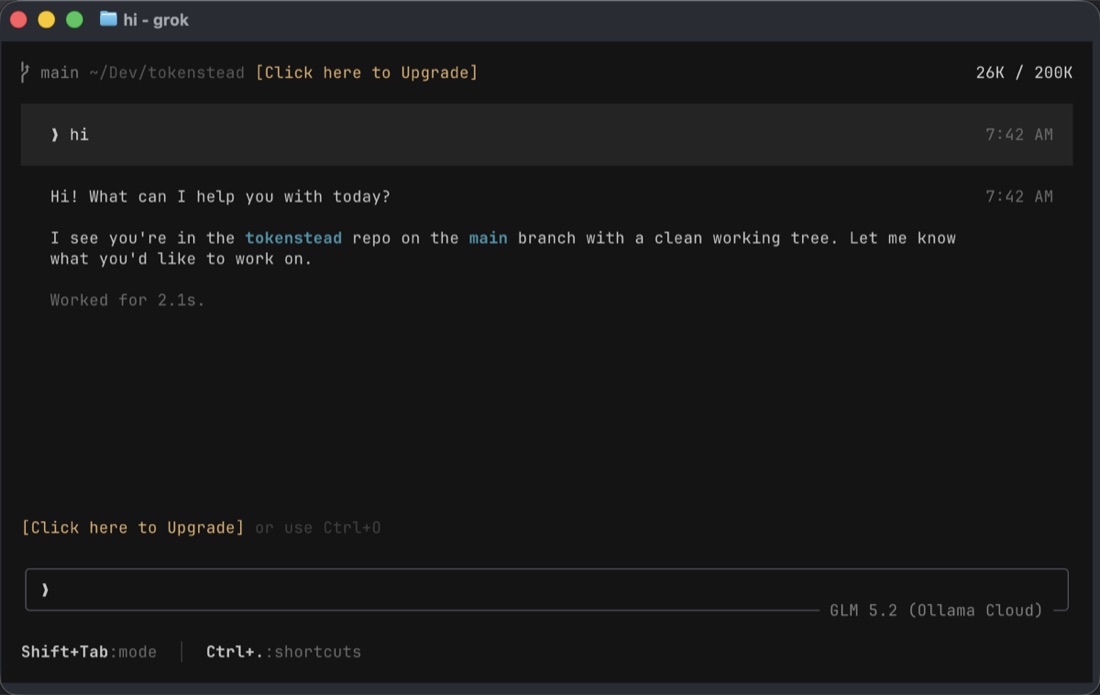
grok driving a session on GLM 5.2 via Ollama Cloud - the model picker, scrollback, and prompt all work as they do with the default grok.com backend.
The one file: ~/.grok/config.toml
Custom models live in ~/.grok/config.toml under [model.<id>] sections. Each entry is a small struct: the model id to send the API, the endpoint, how to authenticate, which protocol to use, and the context window. A minimal entry looks like this:
[model."glm-5.2"]
model = "glm-5.2"
base_url = "https://ollama.com/v1"
name = "GLM 5.2 (Ollama Cloud)"
env_key = "OLLAMA_API_KEY"
api_backend = "chat_completions"
context_window = 200000
Then export the key in your shell and run grok against it:
echo 'export OLLAMA_API_KEY="your-key-here"' >> ~/.zshrc
source ~/.zshrc
grok -m glm-5.2
That is the whole interaction. The key is read from the environment, never written into the config file, and grok sends it as Authorization: Bearer on every request to https://ollama.com/v1/chat/completions.
Ollama Cloud’s OpenAI-compatible endpoint is https://ollama.com/v1 (the api.ollama.com host just 301-redirects there). Its catalog at the time of writing includes glm-5.2, glm-5.1, deepseek-v4-pro, deepseek-v4-flash, kimi-k2.7-code, kimi-k2.6, gpt-oss:120b, gpt-oss:20b, mistral-large-3, qwen3.5, and the Nemotron and MiniMax families. List them with curl -H "Authorization: Bearer $OLLAMA_API_KEY" https://ollama.com/v1/models.
The dot gotcha (the part that bites everyone)
TOML treats dots in a table header as nested keys. [model.glm-5.2] parses as model -> glm-5 -> 2, so grok registers the model id as glm-5, not glm-5.2. grok models will list glm-5 (truncated), and grok -m glm-5.2 will fail with unknown model id. The fix is to quote any id that contains a dot:
[model."glm-5.2"]       # correct - id stays "glm-5.2"
[model.glm-5.2]         # wrong - parses as nested, id becomes "glm-5"
The same applies to kimi-k2.7-code, qwen3.5, and anything else with a dot. Colons in the model = "..." value are fine - only the dots in the section name need quoting. If you see unknown model id on a model you definitely configured, this is why.
Fields, briefly
-
model - the id sent to the API (e.g. glm-5.2, gpt-oss:120b).
-
base_url - the OpenAI-compatible root, no trailing path. grok appends /chat/completions, /responses, or /messages.
-
name - the label shown in the model picker.
-
api_key or env_key - the key. env_key takes a string or an array of env-var names; the first non-empty one wins. The array form is useful for SSH LC_* forwarding (e.g. env_key = ["ANTHROPIC_AUTH_TOKEN", "LC_ANTHROPIC_AUTH_TOKEN"]). Prefer env_key over api_key so the secret stays out of the file.
-
api_backend - chat_completions (default), responses, or messages (Anthropic).
-
context_window - total tokens; controls when grok triggers auto-compaction. If you omit it on a new model, grok assumes 200k - set it to match the real provider.
-
extra_headers - sent verbatim on every request. Use this for Anthropic’s x-api-key and anthropic-version, or for proxy attribution tags.
-
temperature, top_p, max_completion_tokens - sampling knobs.
Credential resolution order, highest first: the api_key field, then env_key, then your grok login session token, then the XAI_API_KEY environment variable. Precedence for the model itself: CLI flag -m > env var > config.toml > remote /v1/models list > hardcoded defaults.
Other providers, same pattern
Because every OpenAI-compatible server speaks the same protocol, adding a provider is one section. None of these require code changes or a rebuild.
Local Ollama (no key, your own machine):
[model.local-llama]
model = "llama3.1"
base_url = "http://localhost:11434/v1"
name = "Llama 3.1 (local)"
OpenRouter (one key, hundreds of models - use their /models endpoint to find ids):
[model."claude-sonnet"]
model = "anthropic/claude-sonnet-4"
base_url = "https://openrouter.ai/api/v1"
name = "Claude Sonnet (OpenRouter)"
env_key = "OPENROUTER_API_KEY"
context_window = 200000
DeepSeek direct:
[model."deepseek-chat"]
model = "deepseek-chat"
base_url = "https://api.deepseek.com/v1"
name = "DeepSeek Chat"
env_key = "DEEPSEEK_API_KEY"
context_window = 64000
Moonshot / Kimi direct:
[model."moonshot-128k"]
model = "moonshot-v1-128k"
base_url = "https://api.moonshot.cn/v1"
name = "Kimi (Moonshot)"
env_key = "MOONSHOT_API_KEY"
context_window = 128000
Anthropic direct (note the messages backend and the two required headers):
[model."claude-opus"]
model = "claude-opus-4"
base_url = "https://api.anthropic.com/v1"
name = "Claude Opus"
api_backend = "messages"
context_window = 200000
extra_headers = { "x-api-key" = "sk-ant-REPLACE", "anthropic-version" = "2023-06-01" }
For Anthropic, put the key in extra_headers (or reference an env var there) because Anthropic authenticates with x-api-key, not Authorization: Bearer. Any vLLM, llama.cpp, or other OpenAI-compatible server is just a base_url change.
Switching models
Pick a model for a session with the CLI flag, or switch mid-session in the TUI:
grok -m glm-5.2 -p "fix the failing test in src/auth.rs"   # headless
grok -m kimi-k2.7-code                                       # start TUI on a model
Inside the TUI: /model glm-5.2 (or the /m alias), or Ctrl+M to open the picker, which lists every built-in and custom model. Set a persistent default so every new session starts on it:
[models]
default = "glm-5.2"
grok models prints the full catalog. Global defaults that apply to every model - temperature, top_p, max_retries, extra_headers - go under a single [models] section instead of being repeated per entry.
Keep the key out of the file
The single most important hygiene rule: never paste an API key into config.toml. The file gets backed up, synced across machines, and occasionally committed by accident. Use env_key and put the export in your shell profile. If a key has been shared in a chat, pasted into a ticket, or checked into a repo, rotate it at the provider’s dashboard and treat the old one as burned.
Two refinements: if you would rather not put secrets in ~/.zshrc either, a secrets manager that exports them on shell start works, and for first-party xAI access grok login stores a session token in ~/.grok/auth.json so you don’t need an API key at all for the default provider.
Verify it
Three checks, in order:
-
grok models lists your entries with the full id (e.g. glm-5.2, not glm-5). If it shows a truncated id, you hit the dot gotcha - quote the section name.
-
grok -m glm-5.2 -p "reply with one word: pong" returns pong. This confirms endpoint, auth, and the chat-completions path end to end.
- If you get an auth error, the env var is not set in the shell you launched grok from -
source ~/.zshrc or open a new terminal.
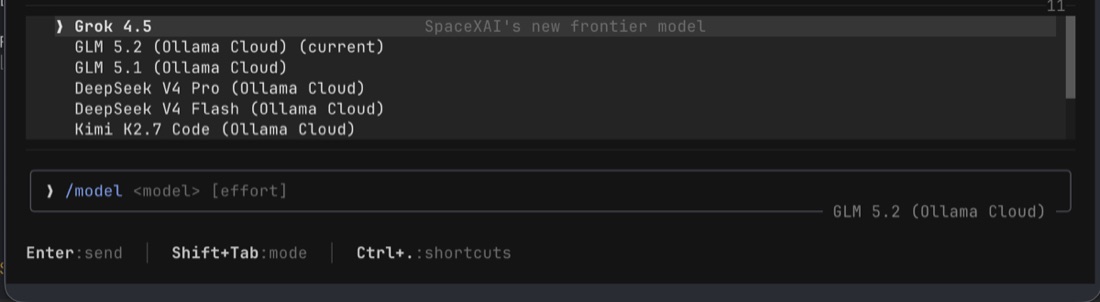
The custom Ollama Cloud models - glm-5.2, deepseek-v4-pro, kimi-k2.7-code, and the rest - appearing in grok’s model list alongside the built-in defaults, ready to switch to with /model or Ctrl+M.
The bigger picture
This works on the released grok binary and on the open-source grok-build fork alike - they share ~/.grok/config.toml. The provider layer is intentionally provider-agnostic: three wire protocols, generalized Bearer / x-api-key auth, and arbitrary extra headers. Adding a new provider is a config entry, not a code change. New wire protocols - something that is not Chat Completions, Responses, or Messages - would need a backend variant plus a stream transform in the sampler crate, but for the vast majority of providers, including every one on this page, you never touch Rust.
For model-level detail on the candidates above - throughput, context, pricing - see GLM 5.2, DeepSeek V4 Pro, DeepSeek V4 Flash, Kimi K2, and Nemotron 3 Ultra in the catalog.