Nvidia’s Spark laptop runs Linux at one third speed
Install Linux on an RTX Spark laptop, plug it in, and the GPU locks to about 780 MHz. The same chip hits 2.2GHz on Windows. On GPT-OSS-120B that is 13.9 tokens per second on native Linux against 65.4 on Windows, 65.1 in WSL and 61 on the DGX Spark desktop. Identical hardware, roughly five times the throughput, decided entirely by which operating system boots.
The cause is a Windows-only component Nvidia ships as “Nvidia Platform Controllers and Framework”, a hidden device in Windows Device Manager that manages how power is split between CPU and GPU on these machines. Linux has no equivalent driver. The firmware table that governs GPU power states is encrypted, and only the Windows driver holds the key.
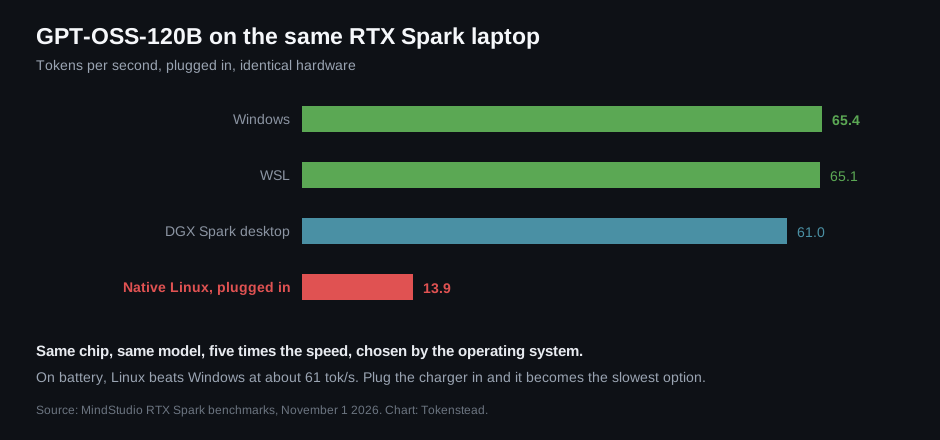
Caption: GPT-OSS-120B on the same MSI Prestige RTX Spark laptop across four setups. Linux is not slower at the model, it is slower at power management. Figure: Tokenstead, from MindStudio’s benchmarks.
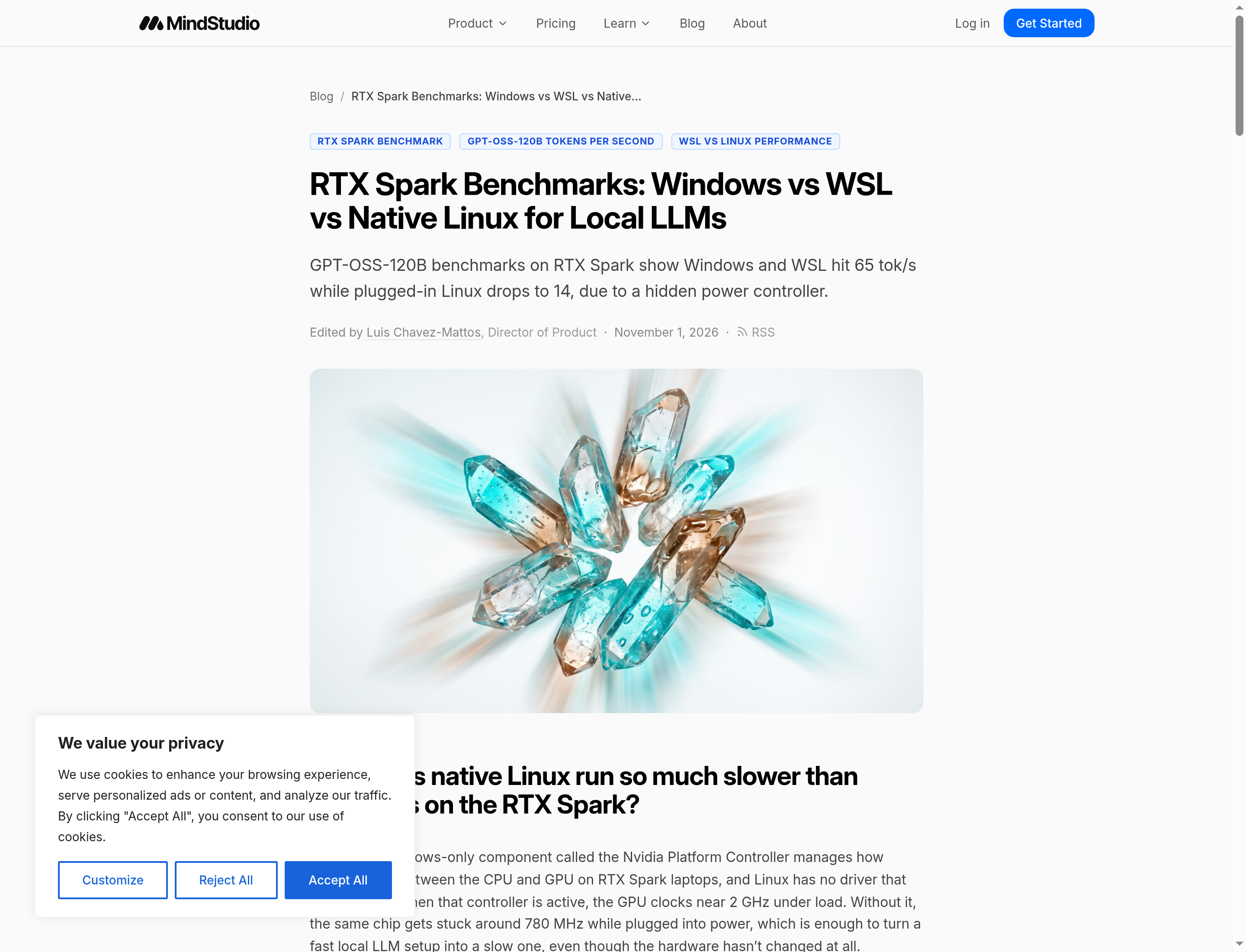
Caption: The benchmark post that ran the numbers across Windows, WSL, native Linux and a DGX Spark desktop. Screenshot: MindStudio.
The experiment that proves it
The MindStudio analysis did the thing that makes a claim into a finding: it disabled the controller on Windows and re-ran the benchmark. Throughput fell from about 83 tokens per second to 32, and clocks fell from 2GHz to 786MHz. That is the Linux number, reproduced on Windows by removing the one driver Linux never had.
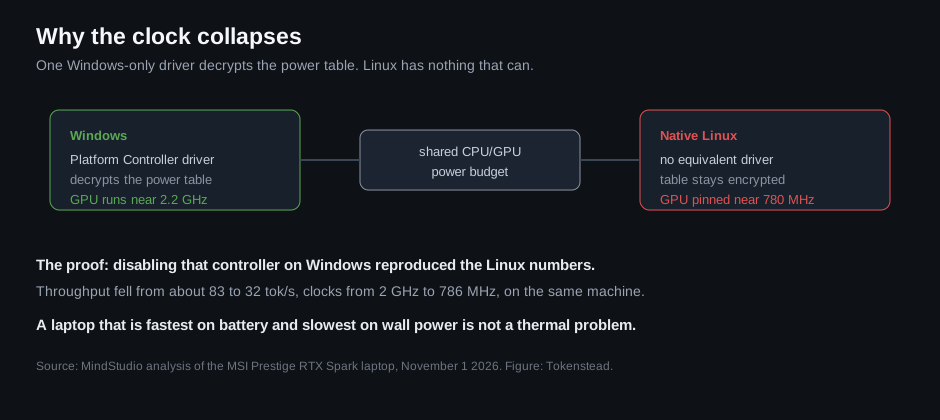
Caption: The mechanism in one picture: Windows decrypts the power table and shares the budget, Linux gets neither. Figure: Tokenstead.
There is a twist that makes it worse for anyone planning a dual boot. On battery power, Linux wins, reaching about 61 tokens per second unplugged. Plug the charger in and it becomes the slowest configuration tested. The machine is fastest on battery and slowest on wall power, which is the opposite of how every laptop on earth behaves.
The memory split is a second, quieter problem
The laptop reserves 96GB of unified memory for the GPU by default, and only Windows exposes a setting to change that split. On Linux the machine inherits whatever the firmware decided, which means before you can even benchmark the GPU you may find the CPU side has almost nothing to work with. WSL sidesteps the clock problem because it rides on the Windows driver, but it defaults to 14GB of memory and needs manual tuning.
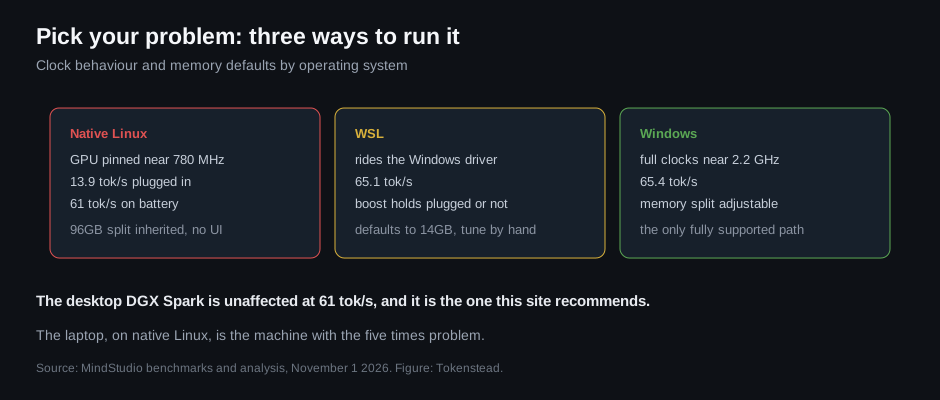
Caption: Choosing an OS on this machine is choosing which problem you get: encrypted clock limits on native Linux, memory defaults in WSL. Figure: Tokenstead.
Caption: The Linux install report: working desktop, GPU acceleration, and a clock that will not leave 780 MHz on wall power. Screenshot: MindStudio.
What it means for the Spark thesis
This site has recommended DGX Spark hardware as a way to get CUDA-native inference in a small box, including a three-Spark cluster build. That recommendation was about the desktop unit, and the desktop unit is not throttled, hitting 61 tokens per second in the same test. The laptop is the different product with the different problem.
If your plan is a Spark laptop as a portable local AI machine, run Windows, or run WSL with the memory split tuned by hand. If your plan is a Spark desktop or a cluster, nothing in this changes it.

Caption: Where the throttle lands: the laptop on native Linux, not the desktop, not the cluster. Figure: Tokenstead.
Why this matters beyond one laptop
The pattern is bigger than Nvidia. As local AI moves onto systems with unified memory and shared power budgets, the operating system becomes part of the performance specification. Firmware that only one OS can configure turns “Linux support” into a checkbox that is technically true and practically useless.
That matters for anyone buying hardware on the assumption that Linux is the safe choice for a local inference box. On this machine it is the slow choice, by a factor of five, and the reason lives in an encrypted table no open driver can read.
Discussion
Be the first to commentStart a discussion
Got a take on this, a rig to show off, or a benchmark that says otherwise? Sign up and start the thread - your comment publishes instantly once you're in.